 MASK
Install MASK
Uninstall other tools with similar functions before installing MASK to avoid conflicts. Use the official repository: http://apt.maskapp.cn/.
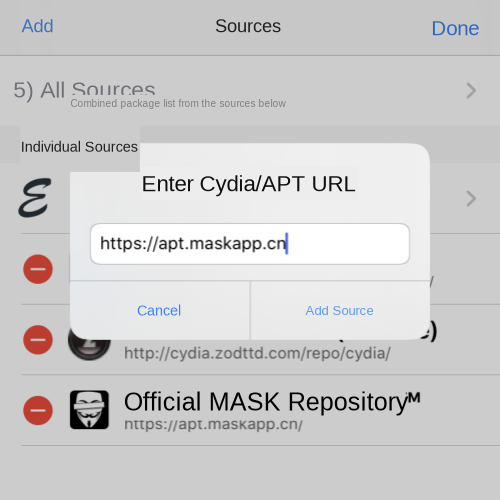
Add the repository in Cydia
1. Open Cydia on your jailbroken device.
2. Tap Sources, then Edit, then Add.
3. Enter http://apt.maskapp.cn/ and tap Add Source.
4. Wait for the sources to refresh, then tap Return to Cydia. If the refresh stalls, cancel and check the connection before trying again.
5. Open the official MASK repository and its MASK section, or All Packages.
6. Select MASK, tap Install (or Modify → Install), then Confirm.
7. Wait for installation to finish and tap Restart SpringBoard when prompted. The screen briefly goes dark before the Home Screen returns. Open MASK from its icon.